
Why Multi-Factor Authentication (MFA) is Essential for EMS Departments
MFA Is No Longer Optional for Critical EMS Accounts
Passwords alone are not enough to protect modern EMS systems. Staff reuse passwords, attackers buy stolen credentials, and phishing kits are built to capture logins at scale. Multi-factor authentication adds a second barrier, which means a stolen password is less likely to become a compromised account. For EMS departments handling patient-related systems, personnel records, shared cloud platforms, and financial tools, MFA should be a baseline control, not an advanced one. ¹ ²
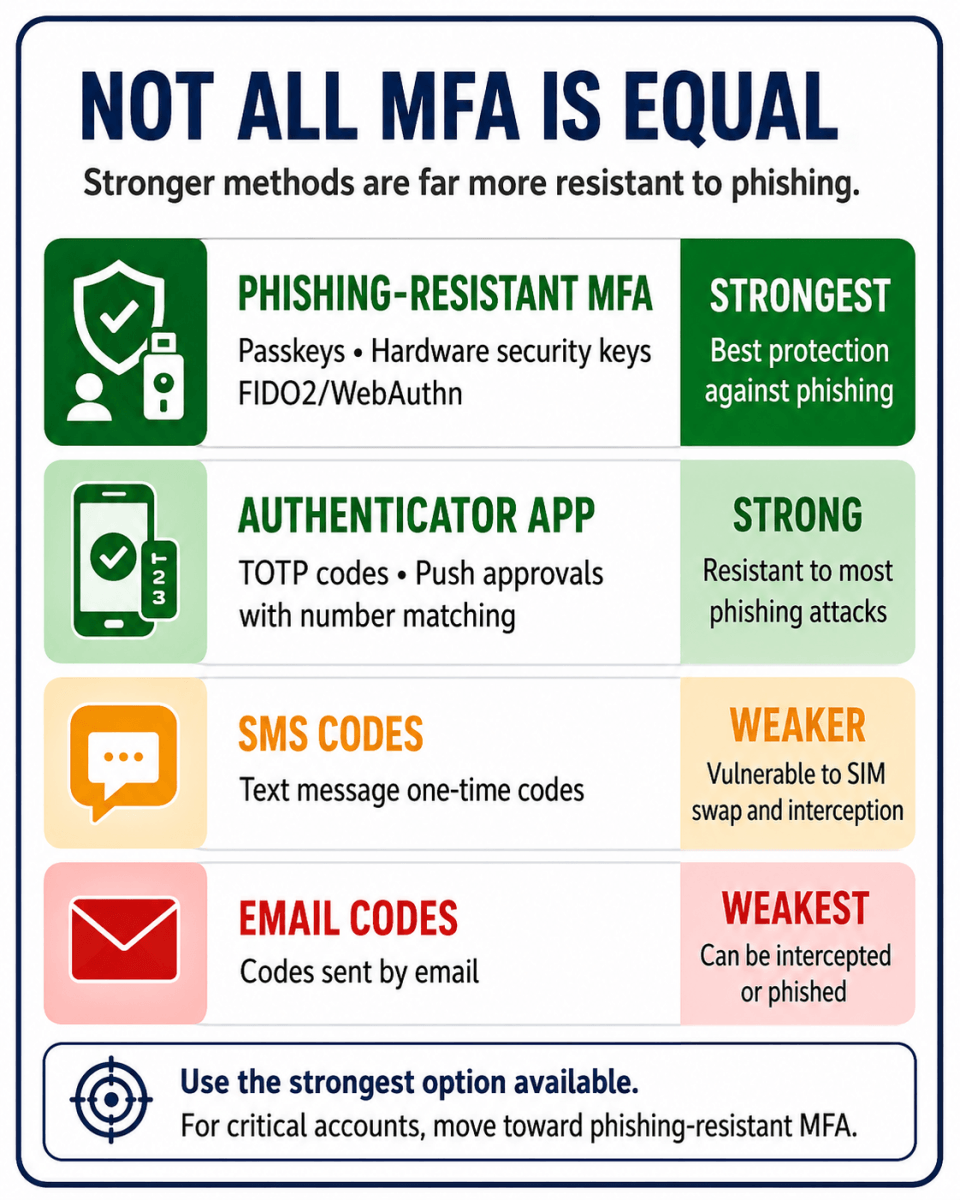
That said, not all MFA is equally strong. Many departments still think of MFA as a single setting: on or off. In reality, some methods are far more resistant to phishing than others. App-based approvals, passkeys, and hardware security keys are generally stronger than SMS codes, and phishing-resistant MFA is the best option for the most sensitive accounts. CISA and Microsoft both continue to emphasize the value of stronger, phishing-resistant approaches because attackers increasingly target users with MFA fatigue, social engineering, and credential-theft workflows. ² ³ ⁴
For EMS leaders, this matters because many high-impact accounts are predictable: chiefs, service directors, billing staff, HR, administrators, and anyone with access to email, file storage, or system administration. If one of those accounts is compromised, the attacker may not need to touch patient care systems directly to cause serious operational disruption. They can change payment information, launch internal phishing, reset passwords, or exfiltrate sensitive documents.
The strongest rollout strategy is usually phased. Start with email, cloud storage, financial systems, and admin accounts. Require MFA for supervisors and privileged users first. Then expand to all users. Where your platforms support it, prefer passkeys, hardware security keys, or authenticator apps over SMS. Also enable number matching or approval details if your MFA platform offers them, so users can better detect fraudulent prompts. ² ³
Just as important, staff need one simple rule: never approve an MFA request you did not initiate. A surprise prompt is not a minor annoyance. It may be the first visible sign that someone already has your password. In that moment, “deny and report” is the right response. ² ³
Microsoft research has found that MFA dramatically reduces the likelihood of account compromise, and more recent Microsoft guidance continues to describe MFA as one of the most effective available protections. But the next evolution is clear: for critical accounts, departments should move toward phishing-resistant MFA wherever feasible. ¹ ² ⁴
Practical Steps for EMS agencies
Turn on MFA for email and cloud systems first. Protect admin and finance accounts before anything else. Prefer authenticator apps, passkeys, or security keys over SMS where possible. Block legacy sign-in methods that do not support MFA. Train staff never to approve unexpected sign-in prompts. And make sure offboarding includes removing MFA devices and recovery methods tied to former employees. ² ³ ⁴
Protecting EMS accounts starts with strong authentication practices. WEMSA Cloud supports multi-factor authentication (MFA) and secure account management tools designed to help Wisconsin EMS agencies better protect sensitive operational and patient-related information.
Learn more about WEMSA Cloud security features and account protection resources at:
www.wisconsinems.com/wemsa-data-center-security
Footnotes
¹ Microsoft Research, How effective is multifactor authentication at deterring cyberattacks?, which found MFA substantially reduces account-compromise risk. https://www.microsoft.com/en-us/research/publication/how-effective-is-multifactor-authentication-at-deterring-cyberattacks
² CISA, “Implementing Phishing-Resistant MFA,” which explains why phishing-resistant methods provide stronger protection than traditional MFA alone. https://www.cisa.gov/sites/default/files/2023-01/fact-sheet-implementing-phishing-resistant-mfa-508c.pdf
³ CISA, “Require MFA in Government,” which recommends MFA, especially phishing-resistant MFA, for government systems and critical information. https://www.cisa.gov/audiences/state-local-tribal-and-territorial-government/secure-us-sltt/require-mfa-government
⁴ Microsoft Learn, “Phishing-resistant MFA,” which outlines Microsoft’s current guidance on stronger authentication approaches. https://learn.microsoft.com/en-us/security/zero-trust/sfi/phishing-resistant-mfa